Wireless Microphone Diversity Receiver Problems and Fixes
Wireless Microphone Diversity Receiver Problems and Fixes
Wireless microphone diversity receiver issues can quickly turn reliable audio systems into costly service calls.
Understanding the fault pattern early saves time, protects show quality, and improves service consistency.
This guide explains common wireless microphone diversity receiver failures, likely causes, and practical field fixes.
Why a Wireless Microphone Diversity Receiver Fails in Real Use
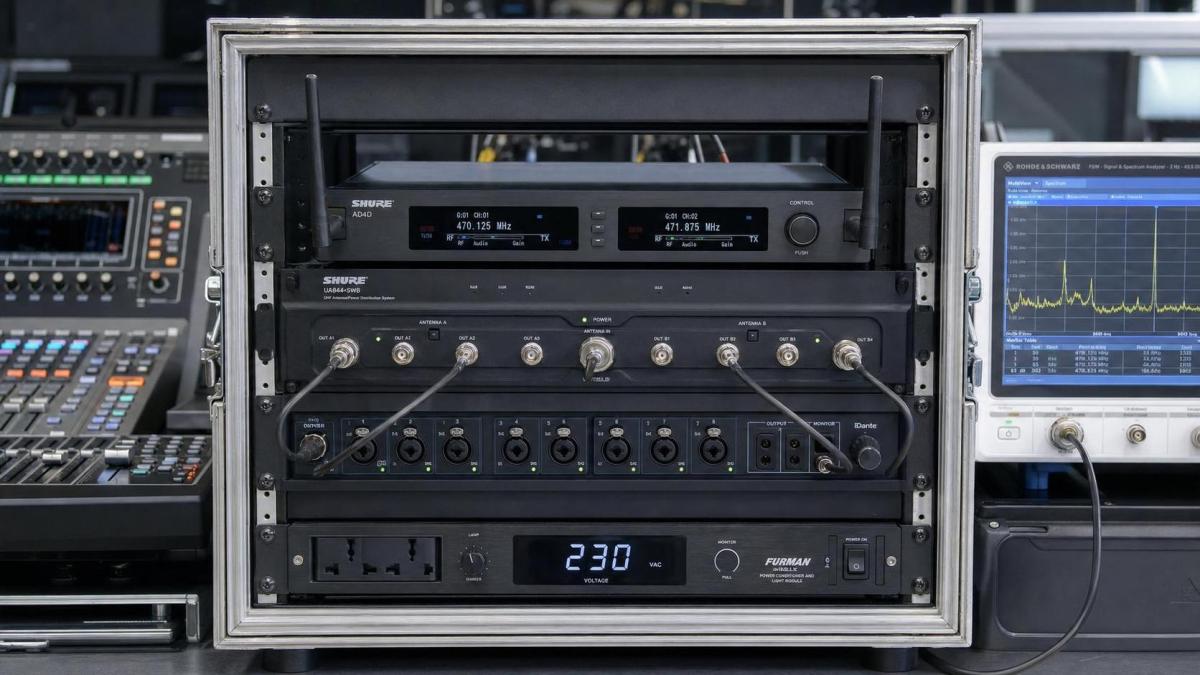
A wireless microphone diversity receiver depends on stable RF conditions, clean power, and correct antenna behavior.
When one of those variables shifts, the receiver may still power on yet perform badly.
From recent service trends, interference and installation mistakes cause more failures than defective hardware.
That matters because many repairs start with replacement, while the real fix is environmental correction.
A diversity design uses two antenna paths and switching logic to reduce dropouts.
If either path is blocked, mismatched, overloaded, or poorly connected, the diversity receiver can make wrong decisions.
The result may look random, but the symptoms usually follow recognizable patterns.
Common Symptoms and What They Usually Mean
Most wireless microphone diversity receiver complaints fall into a short list of repeat issues.
- Audio drops out while RF meters fluctuate sharply.
- Background hiss rises even though the transmitter battery is healthy.
- The receiver switches antennas too often or stays locked to one side.
- Range becomes much shorter than the product specification.
- Several channels work alone, then fail when all systems run together.
- Noise appears only near LED walls, routers, computers, or power amplifiers.
These symptoms point toward RF congestion, antenna faults, front-end overload, poor gain structure, or squelch settings.
The faster you separate RF problems from audio-path problems, the faster the repair process becomes.
Step One: Check the Obvious Before Opening the Unit
Start with external checks.
This avoids unnecessary bench work and often solves the issue on site.
- Confirm the transmitter and wireless microphone diversity receiver are on matched frequency groups.
- Inspect antenna cables for loose BNC connectors, sharp bends, or crushed insulation.
- Verify both antennas are present, correctly oriented, and not hidden behind metal racks.
- Check power supply voltage, polarity, and grounding quality.
- Review receiver output level and mixer input gain to rule out apparent noise caused by bad gain staging.
- Replace transmitter batteries, even if the battery meter still shows partial capacity.
In actual service work, weak batteries still cause misleading RF and audio symptoms.
Low battery voltage can reduce transmitter power before the user notices anything obvious.
Signal Dropouts: The Most Frequent Wireless Microphone Diversity Receiver Problem
Dropouts usually come from multipath cancellation, interference, or antenna placement errors.
A diversity receiver is built to manage multipath, but it still needs usable signal on both branches.
Practical fixes for dropouts
- Move antennas away from rack rails, metal walls, and digital equipment.
- Increase spacing between antenna A and antenna B according to the manufacturer guide.
- Use front-mounted antennas or remote antenna kits in dense rack installations.
- Run a fresh frequency scan with all nearby wireless systems active.
- Reduce transmitter-to-receiver obstructions, especially human bodies and LED structures.
- Check whether antenna boosters are creating overload instead of improvement.
A stronger RF reading is not always better.
If active antenna distribution adds too much gain, the wireless microphone diversity receiver front end can overload.
That often looks like unstable reception across multiple channels.
Noise, Hiss, and Unwanted Audio Artifacts
Not every noisy system has an RF problem.
Sometimes the wireless microphone diversity receiver is clean, but the downstream audio chain is not.
Where the noise usually starts
- Output level set too low at the receiver, forcing excessive preamp gain later.
- Compander artifacts caused by poor transmitter sensitivity settings.
- Ground loops between receiver rack, mixer, and stage power.
- Intermodulation products entering the receiver and creating rough, inconsistent noise.
- Damaged microphone capsules or bodypack input cables.
A quick isolation test helps.
Monitor the receiver headphone or direct output first, then compare it with the console input.
If noise appears only after the mixer, the receiver may not be the real cause.
Diversity Switching Problems and Antenna Path Faults
A healthy wireless microphone diversity receiver should alternate intelligently between antenna paths when needed.
When switching becomes erratic, one side may be weak, noisy, or completely dead.
How to verify the antenna branches
- Swap antenna A and antenna B physically.
- Watch whether the fault follows the cable, the antenna, or the receiver input.
- Measure cable loss if long coax runs are installed.
- Inspect antenna splitters and power injectors for one-sided failure.
- Check connector center pins for recession or oxidation.
This simple swap test saves a lot of time.
It quickly reveals whether the wireless microphone diversity receiver is defective or the RF path is compromised.
Interference, Frequency Coordination, and Intermodulation
As channel counts grow, coordination matters more than raw receiver quality.
A good wireless microphone diversity receiver still fails if frequencies are poorly planned.
The clearer warning sign is trouble that appears only when several systems run together.
What to do in crowded RF environments
- Perform coordination with every active transmitter powered on.
- Avoid locally popular TV bands and known LTE-heavy ranges.
- Keep transmitter power appropriate instead of always using maximum output.
- Separate IEM transmitters from receiver antennas where possible.
- Use manufacturer coordination software when available.
In many venues, frequency coordination is the real fix, not receiver replacement.
This also reduces repeat service calls and unnecessary spare-part costs.
A Fast Field Checklist for Service Teams
When time is limited, use a structured sequence.
This checklist keeps wireless microphone diversity receiver diagnostics consistent across different sites and technicians.
When Bench Repair Is Actually Necessary
After external causes are ruled out, bench-level faults become more likely.
- Damaged RF front-end components after static discharge or lightning exposure.
- Failed diversity switching circuitry.
- Aging electrolytic capacitors affecting power stability.
- Display and control issues that prevent proper coordination changes.
- Internal connector fatigue in touring inventory.
Service records help here.
If the same wireless microphone diversity receiver returns with repeated RF weakness, compare failure history before changing modules.
Repeated symptoms often reveal hidden installation or usage patterns, not isolated electronic failure.
Keep the System Stable After the Fix
The best repair is the one that prevents the next ticket.
Once the wireless microphone diversity receiver is working again, lock in the conditions that made it stable.
- Document final frequencies and antenna layout.
- Label coax runs, splitters, and power adapters clearly.
- Store known-good gain and squelch settings.
- Schedule periodic RF scans in changing venues.
- Train local operators to spot early signs of diversity receiver instability.
A wireless microphone diversity receiver rarely fails without warning.
Short range, antenna imbalance, and sudden noise are usually early indicators.
Catch those signs early, and repairs become faster, cheaper, and more predictable.
Related Intelligence
 Touring CAPEX & Acoustic ROIOct 28, 2026How do off days affect touring AV rental costs on multi-city tours?Touring AV rental costs can continue on off days. Discover how hold rates, crew, and transport affect multi-city tour budgets—and compare smarter options before booking.
 Touring CAPEX & Acoustic ROIOct 28, 2026NAMM and Bass Magazine Announce Inaugural Awards Ceremony at 2026 NAMM ShowNAMM and Bass Magazine announce the inaugural Bass Magazine Awards at the 2026 NAMM Show. Discover how the event will bring bassists, instrument makers and audio suppliers together.
 Touring CAPEX & Acoustic ROIOct 27, 2026How to compare live sound technology provider quotes for a tourCompare live sound technology provider quotes with confidence. Uncover hidden costs, assess crew and backup support, and choose the right tour package before you sign.
 Broadband Acoustic PanelsOct 26, 2026How does panel thickness affect the price of acoustic materials?Explore how panel thickness affects acoustic materials price. Compare absorption, shipping, and installation costs to choose the right panels and avoid paying for unnecessary depth.
 Digital Live Mixing ConsolesOct 26, 2026DiGiCo Launches Quantum638 Digital Mixing Console and Quantum638T Theatre VersionExplore DiGiCo Quantum638 and Quantum638T digital mixing consoles for live sound and theatre. Discover what buyers should verify to choose the right model for their next project.
 Active DSP Line ArraysOct 25, 2026How line array aiming affects live sound coverage for theatersImprove live sound coverage for theaters with smarter line array aiming. Discover how tilt, splay, and trim height help deliver clearer dialogue and more consistent sound across seats.
 CE/FCC & CITES Wood RegsOct 25, 2026EU CITES Appendix D Adds Meranti and Sapele to Import MonitoringEU CITES Appendix D reportedly adds Meranti and Sapele to import monitoring from June 29, 2026. Explore notification requirements and compliance priorities for EU-bound timber.
 5-Axis CNC Tonewood CarvingOct 24, 2026How to reduce tear-out in CNC tonewood processing of guitar topsReduce tear-out in CNC tonewood processing of guitar tops. Discover practical tooling, chip load, and workholding tips to achieve cleaner cuts, protect soundboards, and reduce costly scrap.
 Active DSP Line ArraysOct 24, 2026Metinteractive Rebuilds Bethel Woods Lawn Sound SystemMetinteractive rebuilds the Bethel Woods lawn sound system with EAW amplification and redundant audio paths. Explore the design’s focus on sound clarity and reliability.
 5-Axis CNC Tonewood CarvingOct 23, 2026How workholding affects neck pocket repeatability in CNC luthieryImprove CNC luthiery repeatability with smarter workholding. Learn how datums, support, clamping, and vacuum control help deliver consistent neck pockets and reduce rework.
 Digital Live Mixing ConsolesOct 23, 2026Old World Village Upgrades Audio with Allen & Heath AHM32 and DX88Old World Village upgrades audio with Allen & Heath AHM32 and DX88. Explore how the system supports live sound and zoned audio for its outdoor stage and Biergarten.
 Floating Soundproof FloorsOct 22, 2026How to choose studio soundproofing materials for floating floorsChoose studio soundproofing materials for floating floors with confidence. Compare loads, resonance, acoustic tests, and installation details to avoid costly mistakes and improve isolation.
 Feedback Suppression DSPOct 22, 2026Pine DSP Launches Blox Rack Modular Effects Rack PluginDiscover Pine DSP Blox Rack, a modular effects rack plugin with EQ, compression, reverb and more. Explore its modulation tools and what to check before adding it to your DAW workflow.