Diffuser Design Software: Key Features to Compare
Diffuser Design Software: Key Features to Compare
Choosing the right diffuser design software can change how confidently you evaluate room acoustics. For projects that involve studios, theaters, worship spaces, or multipurpose venues, the software has to do more than draw shapes. It should help you predict scattering behavior, compare layouts, and support real design decisions.
In practice, diffuser design software becomes useful when it connects geometry, frequency response, and workflow. The best tools reduce guesswork, while weak tools create nice visuals but poor decisions. That is why feature comparison matters before purchase.
Start with simulation accuracy
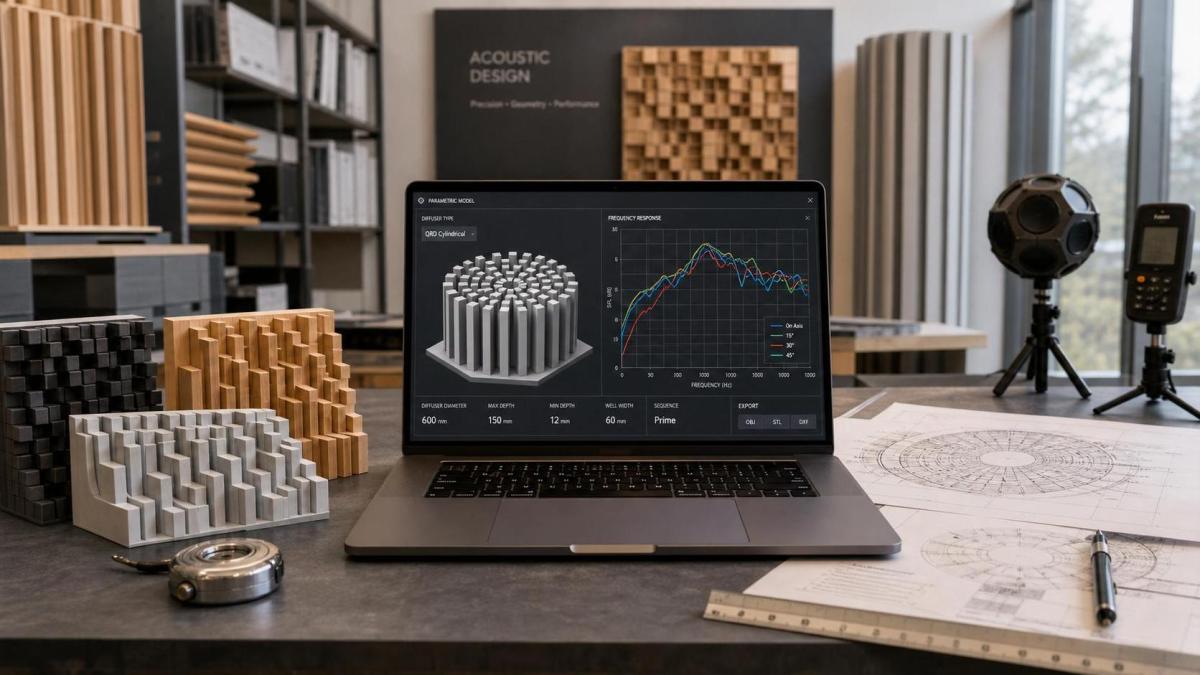
The first thing to compare is simulation precision. A diffuser is not a decorative surface; its performance depends on depth, sequence, periodicity, and frequency range. Good diffuser design software should model these variables with enough detail to support technical evaluation.
Look for tools that can calculate diffusion coefficients, scattering patterns, and frequency-dependent behavior. If the software only offers basic visual previews, it may miss the acoustic differences that matter in the final room. That gap can lead to expensive revisions later.
For PMAS-style workflows, accuracy also matters because diffuser design often sits inside a larger room-acoustics plan. The software should help you understand how the diffuser interacts with absorption, reflection paths, and target listening positions.
Check geometry and material flexibility
Different projects need different diffuser types. Some use QRD structures, while others need skyline profiles or custom hybrid forms. Strong diffuser design software should let you compare geometry options without forcing a rigid template.
Material flexibility is just as important. Surface depth, panel thickness, manufacturing limits, and finish options all affect performance and cost. A practical platform lets you adjust these inputs early, so the design stays realistic.
If the software can model build constraints, it becomes much easier to move from concept to fabrication. That is a real advantage for teams that need to balance acoustic targets with workshop capability.
Compare export and integration options
A diffuser model rarely lives alone. It usually needs to move into CAD drawings, acoustic reports, or room-planning files. So export compatibility is a major comparison point in diffuser design software.
At minimum, check whether the platform supports common file formats used by design and fabrication teams. Better tools also let you transfer dimensions, profiles, and annotations without manual rework. That saves time and reduces translation errors.
Integration with broader acoustics planning tools is another plus. When diffuser design software can sit beside simulation, venue layout, and documentation workflows, teams spend less time copying data and more time solving problems.
Evaluate usability for technical review
Technical evaluators need speed, but not at the expense of control. The interface should make it easy to define geometry, test variants, and compare output without forcing unnecessary clicks.
A good user experience matters more than it first appears. If the workflow is clumsy, teams often test fewer options, and the final choice becomes less reliable. Diffuser design software should support rapid iteration while still showing enough detail for serious review.
Useful features include preset templates, clear parameter panels, version tracking, and visual comparison tools. These make it easier to review several diffuser concepts side by side and explain the trade-offs to clients or internal stakeholders.
Review reporting and decision support
A strong platform should help you defend the choice, not just generate it. Reporting tools are especially valuable when diffuser design software is used in procurement, engineering review, or vendor comparison.
Look for exportable charts, frequency summaries, and design notes that clearly show why one solution performs better than another. If the software can generate clean reports, it becomes easier to align engineering, purchasing, and project delivery.
This is also where decision support features stand out. Some platforms highlight weak ranges, identify geometry limits, or flag build risks. Those signals help evaluators move from “looks good” to “fits the room and the budget.”
Use a practical comparison checklist
When you compare diffuser design software, use a simple checklist instead of relying on brand claims.
- Verify simulation accuracy across the target frequency range.
- Test whether geometry options match your real project needs.
- Confirm material and thickness settings reflect fabrication limits.
- Check export formats for CAD, reporting, and documentation workflows.
- Measure how fast the software supports variant comparison.
- Review whether the tool fits broader room-acoustics planning.
If possible, run one real project through each shortlisted platform. A short pilot often reveals whether the software is genuinely useful or only impressive in a demo. That step can prevent expensive mismatches later.
What separates a strong platform from a weak one
The strongest diffuser design software usually combines three things: credible acoustic modeling, flexible geometry control, and clean workflow support. When those pieces work together, the software becomes part of the design process rather than a separate task.
By contrast, weaker tools often focus on appearance, not engineering depth. They may be fine for early concept visuals, but they are risky for final evaluation. If your goal is reliable room performance, the gap matters.
In real projects, the best choice is usually the one that helps you compare options quickly, document them clearly, and defend the decision with data. That balance is what makes diffuser design software valuable.
Final take
If you are shortlisting diffuser design software, focus on simulation precision, geometry flexibility, export compatibility, usability, and reporting strength. Those features have the biggest impact on design quality and project efficiency.
The right platform should help you evaluate diffuser design software with confidence, not add noise to the process. Start with one real use case, compare the outputs carefully, and choose the tool that fits your technical and workflow requirements best.
Related Intelligence
 AoIP Network ProtocolsAug 10, 2026Audio over IP Integration: How to Balance Latency, Redundancy, and ScalabilityAudio over IP integration explained for real-world projects: learn how to balance latency, redundancy, and scalability to build reliable, future-ready professional audio networks.
 Broadband Acoustic PanelsAug 10, 2026EU CE Rule Takes Effect for Acoustic ProductsEU CE Rule Takes Effect for Acoustic Products: learn how EN 1793-5:2026, Class B-s1,d0 testing, and CE marking reshape EU imports, compliance, and delivery planning.
 Touring CAPEX & Acoustic ROIAug 09, 2026Concert Hall Acoustic Design Planning: How to Balance RT60, Clarity, and BudgetConcert hall acoustic design planning made practical: learn how to balance RT60, clarity, room use, and budget to compare solutions wisely and avoid costly acoustic mistakes.
 CE/FCC & CITES Wood RegsAug 09, 2026CITES Annex II Permit Rule Expands for Brazilian RosewoodCITES Annex II permit rule expands for Brazilian rosewood, reshaping export compliance, sourcing, and customs checks. Learn what Dalbergia nigra traders must review now.
 Digital Live Mixing ConsolesAug 08, 2026How to Evaluate a Live Event Production Technology Supplier for System Reliability and ScalabilityLive event production technology supplier evaluation made practical: learn how to verify reliability, scalability, interoperability, and support before choosing a system for demanding events.
 Class-D Digital AmplifiersAug 08, 2026EU CE Rule Adds 96 kHz EMC Requirement for Audio AmplifiersEU CE Rule Adds 96 kHz EMC Requirement for Audio Amplifiers. Learn how EN 55032:2026/A2:2026 impacts CE marking, export compliance, testing timelines, and EU shipment readiness.
 CE/FCC & CITES Wood RegsAug 07, 2026What CE Marking for Percussion Instruments Covers and the Documents Importers NeedPercussion instruments CE requirements vary by design, electronics, toy status, and market use. Learn what CE marking covers and which importer documents you should verify before ordering.
 CE/FCC & CITES Wood RegsAug 07, 2026CITES Annex II Rule Tightens Dalbergia nigra ExportsCITES Annex II rule tightens Dalbergia nigra exports from Aug 7, 2026. Learn how permit checks, legal harvest proof, and customs compliance will impact wood parts trade.
 Digital Live Mixing ConsolesAug 06, 2026Live Sound Technology Trends Shaping Console and PA UpgradesLive sound technology trends reshaping console and PA upgrades: explore lower latency, smarter DSP, audio networking, and scalable systems that improve ROI, control, and uptime.
 Broadband Acoustic PanelsAug 06, 2026EU CE Rule Tightens for Acoustic ProductsEU CE rule tightens for acoustic products under EN ISO 16283-1:2026. Learn how new testing, certification, and CE marking changes may impact EU market access.
 Class-D Digital AmplifiersAug 05, 2026How to Verify CE Compliance for Class-D Amplifiers Before ImportClass-D amplifiers CE checks go beyond the logo. Learn how to verify DoC, EMC, safety reports, labels, and revisions before import to reduce EU customs and compliance risk.
 Carbon Fiber Acoustic GuitarsAug 05, 2026CITES Tightens Rules on Brazilian Rosewood DerivativesCITES tightens Brazilian rosewood derivative rules, raising compliance risks for Carbon Fiber Acoustic Guitars. Learn permit, traceability, and customs steps for EU, UK, and Japan trade.
 AoIP Network ProtocolsAug 04, 2026Dante AoIP Network Architecture: How to Design for Scalability and RedundancyDante AoIP network architecture explained: learn how to design scalable, redundant audio networks with better topology, QoS, clocking, and failover for reliable performance.